Aruba OS-CX
Global Configuration
Using Interface Persona (Template)
Description
Starting in Aruba OS CX 10.10 a new feature called interface persona was introduced. This feature allows you to build interface templates and attach or copy a interfaces to those personas (templates). This is great for configuring multiple interfaces with the same configuration.
There are a couple of things to note, copying a interface persona will copy the config from the persona into the interface and nothing more. Attaching a interface to a persona will link the configuration to the persona, if you make a change to the persona it will also change all of the interfaces that are attached to the persona. You will see how to attach a interface to a persona in the config example below.
Defining a interface persona
In this example I am setting up a dot1x persona (template) that I want to apply to several interfaces.
interface persona dot1x-auth
no shutdown
mtu 9198
no routing
vlan access 1
qos trust dscp
loop-protect action tx-rx-disable
aaa authentication port-access client-limit 10
aaa authentication port-access dot1x authenticator
eapol-timeout 10
max-eapol-requests 1
max-retries 1
enable
aaa authentication port-access mac-auth
enable
Attaching a interface to a persona
This is an example of a default interface before I attach it to a persona
show running-config interface 1/1/10
interface 1/1/10
no shutdown
no routing
vlan access 1
exit
Now I will attach the interface to a persona
(config)# interface 1/1/10
CX6300-Core(config-if)# persona custom dot1x-auth attach
After the interface has been attached to the persona you can see that the interface is linked to the configuration in the persona
# show running-config interface 1/1/10
interface 1/1/10
no shutdown
persona custom dot1x-auth attach
mtu 9198
no routing
vlan access 1
qos trust dscp
aaa authentication port-access client-limit 10
aaa authentication port-access dot1x authenticator
eapol-timeout 10
max-eapol-requests 1
max-retries 1
enable
aaa authentication port-access mac-auth
enable
loop-protect action tx-rx-disable
exit
Random Examples
Prioritize and Rate Limit
This is an example configuration showing how to apply prioritization and rate limiting on a interface level.
class ip any
10 match any any any
class ip priority-hosts
10 match any 10.128.0.120 any
20 match any any 10.128.0.120
policy elan-in
10 class ip priority-hosts action local-priority 6
20 class ip any action local-priority 1
policy elan-out
10 class ip priority-hosts action cir kbps 20480 cbs 128 exceed drop
20 class ip any action cir kbps 286720 cbs 256 exceed dropinterface 1/1/27
no shutdown
mtu 9198
no routing
vlan trunk native 1280
vlan trunk allowed all
qos trust dscp
loop-protect action tx-rx-disable
apply policy elan-in in
apply policy elan-out outinterface 1/1/28
no shutdown
mtu 9198
no routing
vlan trunk native 1280
vlan trunk allowed all
qos trust dscp
loop-protect action tx-rx-disable
apply policy elan-in in
apply policy elan-out out
EVPN/VXLAN
Symmetric IRB
AOS-CX EVPN/VXLAN Symmetric IRB
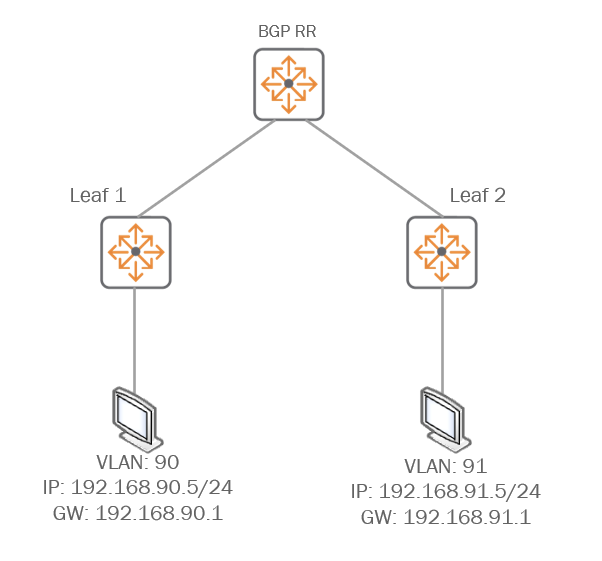
Configuration for Route Reflector
bfd
!
vlan 1280
name data-1280
vlan 4020
name vxlan-connect
evpn
vlan 1280
rd auto
route-target export auto
route-target import auto
interface 1/1/23
no shutdown
mtu 9198
no routing
vlan access 4020
interface 1/1/24
no shutdown
mtu 9198
no routing
vlan access 4020
interface loopback 1
ip address 10.255.1.1/32
ip ospf 1 area 0.0.0.0
interface vlan 4020
ip mtu 9198
ip address 172.16.1.10/24
ip ospf 1 area 0.0.0.0
no ip ospf passive
interface vxlan 1
source ip 10.255.1.1
no shutdown
vni 1001280
vlan 1280
router ospf 1
router-id 10.255.1.1
passive-interface default
bfd all-interfaces
redistribute connected
area 0.0.0.0
router bgp 65001
bgp router-id 10.255.1.1
neighbor mcast-mdf peer-group
neighbor mcast-mdf remote-as 65001
neighbor mcast-mdf update-source loopback 1
neighbor 10.255.1.2 peer-group mcast-mdf
neighbor 10.255.1.3 peer-group mcast-mdf
address-family l2vpn evpn
neighbor mcast-mdf send-community both
neighbor 10.255.1.2 route-reflector-client
neighbor 10.255.1.2 activate
neighbor 10.255.1.3 route-reflector-client
neighbor 10.255.1.3 activate
exit-address-family
!
Configuration for leaf 1 switch VLAN 90
bfd
vrf Data
rd 65001:100
route-target export 65001:100 evpn
route-target import 65001:100 evpn
vlan 90
name v90
vlan 1280
name Data-1280
vlan 4020
name vxlan-connect
virtual-mac 00:00:02:00:03:00
evpn
vlan 90
rd auto
route-target export auto
route-target import auto
redistribute host-route
vlan 1280
rd auto
route-target export auto
route-target import auto
interface 1/1/11
no shutdown
no routing
vlan access 90
interface 1/1/24
no shutdown
no routing
mtu 9198
vlan access 4020
interface loopback 1
ip address 10.255.1.3/32
ip ospf 1 area 0.0.0.0
interface vlan 90
vrf attach Data
ip address 192.168.90.1/24
active-gateway ip mac 00:00:02:00:00:03
active-gateway ip 192.168.90.1
interface vlan 1280
ip address 10.128.0.251/24
interface vlan 4020
ip mtu 9198
ip address 172.16.1.30/24
ip ospf 1 area 0.0.0.0
interface vxlan 1
source ip 10.255.1.3
no shutdown
vni 1000090
vlan 90
vni 1001280
vlan 1280
vni 2000100
vrf Data
routing
!
router ospf 1
router-id 10.255.1.3
bfd all-interfaces
area 0.0.0.0
router bgp 65001
bgp router-id 10.255.1.3
neighbor mcast-core peer-group
neighbor mcast-core remote-as 65001
neighbor mcast-core update-source loopback 1
neighbor 10.255.1.1 peer-group mcast-core
neighbor 10.255.1.2 peer-group mcast-core
address-family l2vpn evpn
neighbor mcast-core send-community both
neighbor 10.255.1.1 activate
exit-address-family
!
vrf Data
address-family ipv4 unicast
redistribute connected
exit-address-family
!
Configuration for leaf 2 switch VLAN 91
bfd
vrf Data
rd 65001:100
route-target export 65001:100 evpn
route-target import 65001:100 evpn
vlan 91
name v91
vlan 1280
name data-1280
vlan 4020
name vxlan-connect
virtual-mac 00:00:02:00:02:00
evpn
vlan 91
rd auto
route-target export auto
route-target import auto
redistribute host-route
vlan 1280
rd auto
route-target export auto
route-target import auto
interface 1/1/11
no shutdown
no routing
vlan access 91
interface 1/1/48
no shutdown
mtu 9198
no routing
vlan access 4020
interface loopback 1
ip address 10.255.1.2/32
ip ospf 1 area 0.0.0.0
interface vlan 91
vrf attach Data
ip address 192.168.91.1/24
active-gateway ip mac 00:00:02:00:00:02
active-gateway ip 192.168.91.1
interface vlan 4020
ip mtu 9198
ip address 172.16.1.20/24
ip ospf 1 area 0.0.0.0
no ip ospf passive
interface vxlan 1
source ip 10.255.1.2
no shutdown
vni 1000091
vlan 91
vni 1001280
vlan 1280
vni 2000100
vrf Data
routing
!
router ospf 1
router-id 10.255.1.2
passive-interface default
bfd all-interfaces
redistribute connected
area 0.0.0.0
router bgp 65001
bgp router-id 10.255.1.2
neighbor mcast-core peer-group
neighbor mcast-core remote-as 65001
neighbor mcast-core update-source loopback 1
neighbor 10.255.1.1 peer-group mcast-core
neighbor 10.255.1.3 peer-group mcast-core
address-family l2vpn evpn
neighbor mcast-core send-community both
neighbor 10.255.1.1 activate
exit-address-family
!
vrf Data
address-family ipv4 unicast
redistribute connected
exit-address-family
!